
前言
所谓非侵入式监控PHP应用性能,就是不修改现有系统代码,而对系统进行监控。这样的系统才能更容易的应用到PHP应用中。这里抛砖引玉,欢迎大家交流。
方案一
如果只是监控每次请求的访问时间。直接检测nginx的日志即可。在nginx的日志中有两个选项。$request_time 和 $upstream_response_time 。 这两个选项记录了响应时间。
1、$request_time 指的就是从接受用户请求的第一个字节到发送完响应数据的时间,即包括接收请求数据时间、程序响应时间、输出响应数据时间。
2、$upstream_response_time 是指从Nginx向后端(php-cgi)建立连接开始到接受完数据然后关闭连接为止的时间。
如果只是监控后端PHP服务的性能,只要更多的关注 $upstream_response_time 这个选项即可。
方案二
如果还想进一步一个PHP请求处理过程中,具体那部分占用时间比较多,就需要借助xhprof了。xhprof可以生成调用关系图,一目了然的可以看出那部分占用时间比较多。如下图(来源于网络):
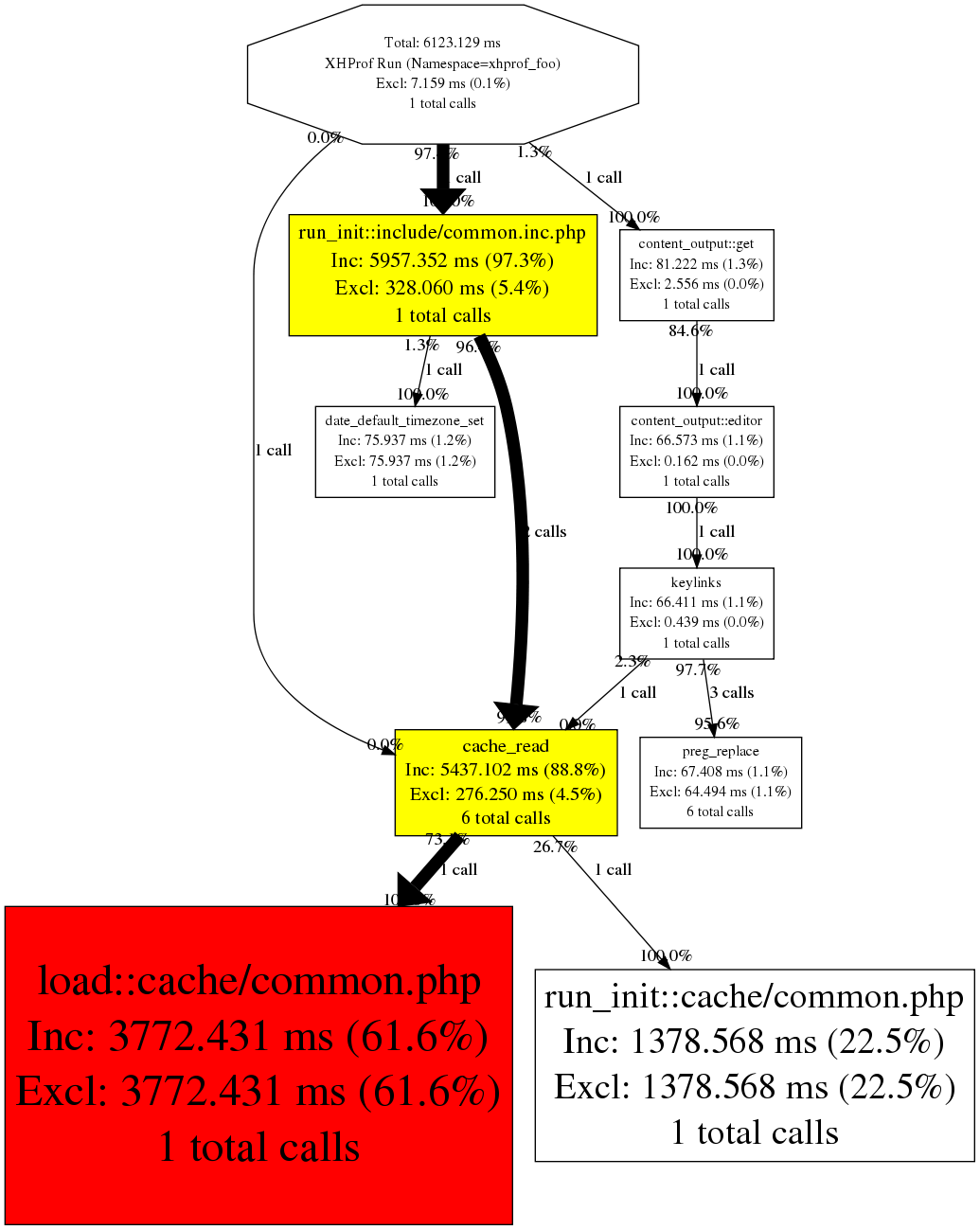
下面是完整的搭建步骤:
下载安装xhprof
1、下载编译安装的命令如下:
$wget https://github.com/phacility/xhprof/archive/master.zip
$unzip ./xhprof_master.zip
$cd ./xhprof_master/extension
$/usr/local/php/bin/phpize
$./configure --with-php-config=/usr/local/php/bin/php-config
$make
$make install
注意,我的php是安装在/usr/local/php目录。根据您的情况,适当修改上面的路径。
2、修改配置文件php.ini
$vim /etc/php.ini底部增加如下内容:
[xhprof]
extension=xhprof.so
xhprof.output_dir=/tmp/xhprof
3、通过下面的命令检测xhprof是否安装成功
$/usr/local/php/bin/php -m如果以上命令输出内容中有xhprof字样,说明xhprof扩展安装成功。
4、拷贝xhprof相关程序到指定目录
$mkdir -p /www/sites/xhprof
$cp -r ./xhprof_master/xhprof_html /www/sites/xhprof
$cp -r ./xhprof_master/xhprof_lib /www/sites/xhprof
5、修改nginx配置,以便通过url访问性能数据:
在nginx中增加如下代码:
server {
        listen  8999;
        root    /opt/sites/xhprof/;
        index  index.php index.html;
        location ~ .*\.php$ {
        add_header  Cache-Control "no-cache, no-store, max-age=0, must-revalidate";
        add_header  Pragma  no-cache;
        add_header Access-Control-Allow-Origin *;
        add_header      Via "1.0 xgs-150";
        fastcgi_pass   127.0.0.1:9000;
        fastcgi_index  index.php;
        include fastcgi.conf;
        fastcgi_connect_timeout 300;
        fastcgi_send_timeout 300;
        fastcgi_read_timeout 300;
        }
}
6、部署性能数据采集程序
把xhprof.php文件部署到 /www/sites/xhprof.php 。xhprof.php文件内容如下:
<?php
define("XH_LOG_PATH", "/tmp/xhprof.log");
$xh_force_disable = false; //设置性能分析是否启用,设置为true表示关闭。
$max_time = 100; //millisecond

$xh_enable = false;
$start_time = microtime(true);

//这里可以设置需要进行性能分析的url和设置的超时时间。如果指定的url,响应时间超过了设置的超时时间,性能分析数据就会被记录下来。超时时间的单位为毫秒。
$xh_conf["urls"] = array(
    //url => max_time
    "/i/content/getdetail.json" => 100,
);

function xh_save_data(){
    global $start_time, $xh_force_disable, $xh_enable, $max_time;
    $end_time = microtime(true);
    $cost_time = $end_time - $start_time;
    $cost_time *= 1000;
    if( $cost_time > $max_time && !$xh_force_disable && $xh_enable ){
        include_once "/www/sites/xhprof/xhprof_lib/utils/xhprof_lib.php";
        include_once "/www/sites/xhprof/xhprof_lib/utils/xhprof_runs.php";
        $xhprof_data = xhprof_disable();
        $objXhprofRun = new XHProfRuns_Default();
        $run_id = $objXhprofRun->save_run($xhprof_data, "xhprof");
        $log_data = "cost_time||$cost_time||run_id||$run_id||request_uri||".$_SERVER["REQUEST_URI"]."\n";
        //高并发下 可能会出现错乱情况。建议把 const_time run_id request_uri 写入到数据库
        file_put_contents(XH_LOG_PATH, $log_data, FILE_APPEND);
    }
}
$xh_request_uri = isset($_SERVER["REQUEST_URI"]) ? $_SERVER["REQUEST_URI"] : "";
$arr_xh_cur_url = explode("?", $xh_request_uri);
$xh_cur_url = $arr_xh_cur_url[0];
if( !$xh_force_disable && isset($xh_conf["urls"][$xh_cur_url]) ){
    $xh_enable = true;
    $max_time = $xh_conf["urls"][$xh_cur_url];
    xhprof_enable(XHPROF_FLAGS_CPU + XHPROF_FLAGS_MEMORY);
    register_shutdown_function("xh_save_data");
}else{
    $xh_enable = false;
}
?>
把这个代码文件部署到/www/sites/xhprof.php目录后,就可以启用这个文件了。因为我们想对PHP应用代码不进行代码侵入,那么我们就只能通过如下几种方式启用:
* Nginx/PHP-FPM 方式:
fastcgi_param PHP_VALUE "auto_prepend_file=/www/sites/xhprof.php";
* Apache 方式:
php_value auto_prepend_file "/www/sites/xhprof.php"
* php.ini 方式:
auto_prepend_file="/www/sites/xhprof.php"
注意:如果使用了 opcode 缓存,记得要重启你的 php 进程。
7、查看性能分析日志
$tail /tmp/xhprof.log
$cost_time||200||run_id||adadfdsadad||request_uri||/i/content/getcontent.json
上面输出内容中:
cost_time 耗时 200毫秒
run_id 为 adadfdsadad
request_uri 为 /i/content/getcontent.json
8、根据run_id 查看性能分析数据
http://127.0.0.1:8999/xhprof_html/index.php?run=adadfdsadad
查看方式请参考 http://www.cnblogs.com/siqi/p/3790186.html
注意:
1、在正式启用前,一定要确认不会影响正常的数据输出。确认输出内容无异后,再上线。
2、每个url的max_time不要设置的过小。
3、xhprof会影响线上服务的性能,因此最好只在一台机器上进行监控,或者 修改xhprof.php代码,对请求进行随机监控。
相关推荐
另外,有一个xhprof gui的开源程序不错。提供更友好的界面。相关介绍查看,xhprof gui,让xhprof界面更漂亮,功能更强大