
花了两个晚上把 OPF 和 epub 格式整明白了,准备把订阅的 RSS 内容抓取下来做成电子书推到 kindle 中阅读。后续也会把自己博客整成电子书,提供给习惯 kindle 阅读的朋友。研究这些东西目的还是想回到比较纯粹的阅读设备上,毕竟手机屏小干扰多,看久了眼睛也有点不舒服。
本项目旨在写一个 Kindle 电子书的构建工具,从互联网上抓取数据,合并整合都生成一本小巧的 .mobi 电子书。而使用这个工具,你只需要编辑下配置文件,或者直接运行命令行工具。
基本原理:根据 OPF 规范生成 KF8 格式的
.mobi电子书
注意: 项目中提供的 /bin/kindlegen 文件只适用于 Mac 系统,如果您使用的是 windows,需要在这里下载对应的 kindleGen,并替换本项目中的文件。 感谢 hillwah 的 PR,帮我添加了对其他平台的支持。
项目结构
数据有这么几个来源:
通过抓取单个 uri 的内容,配合 title 和 content DOM 选择器,获取文章的标题和内容
通过抓取 RSS 源获取内容
使用本地数据,比如 hexo build 目录下的 html 文件
下图为该工具的一个结构图:
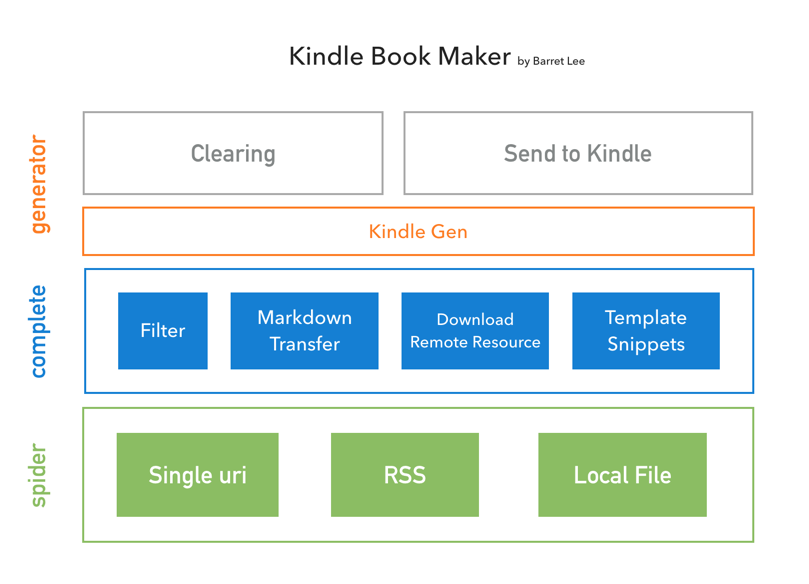
抓到数据后,工具会帮助分析过滤数据,尤其对 hexo 生成的文件做了特殊的处理,后续也会添加几个扩展功能(比如之间转换 markdown 文件),如果 html 中包含了远程内容——CSS、图片等——程序会全部抓取过来。
最后,使用官方提供了 kindleGen 工具构建,我已经把这个文件放到了 /bin/kindlegen下,大约 28M,有点大。
使用方法
可以下载代码之后,尝试运行下已经提供了一个 DEMO(封面图片就懒得换了,是我自己的头像):
git clone https://github.com/barretlee/kindleBookMaker.git;
cd kindleBookMaker;
npm install;
node index;
open build/*.mobi;
提供了很多方法可以调用,不过都通过命令行的方式简化了:
从 RSS 源构建:
node index --rss http://barretlee.com/rss2.xml
# node index -r http://barretlee.com/rss2.xml
从单个 URI 构建,
-u URL titleQuery ContentQuery FilterRegExp, 其中 titleQuery 为文章标题的 css query,ContentQuery 为文章主要内容的 css query,FilterRegExp 为正则过滤:node index --uri \ http://www.barretlee.com/blog/2016/04/28/mini-query/ \ .post-title \ .post-content \ /<div class="shit-spider"[\s\S]+?<\/div>/从本地构建
node index --dirctory ./src/demo/
# node index -d ./src/demo/
还有另外三个参数:
--verbose,-v, 查看 kindle 构建的详细细节,因为编译也可能出错--help,-h, 帮助说明-push2kindle,-p, 将构建的.mobi文件推送你设定的 kindle 账户上
配置
var moment = require('moment');

module.exports = {
// entry: './src/KF8-Demo',
  entry: {
    base: './src/KF8-Demo',
    list: []
  },
  bookInfo: {
    title: "Barret Lee's Personal Website",
    lang: "zh",
    creator: "Barret Lee",
    copyright: "Barret Lee",
    publisher: "",
    coverImage: 'coverImage.png'
  },
/*option*/
  output: {
    base: './build',
    format: '[name]-' + moment().format('YYYYMMDD')
  },
/*option for uri*/
  singlePage: {
    title: 'div.title',
    description: 'div.content',
    reg: function(data) {
return data.replace(/<div class="shit-spider"[\s\S]+?<\/div>/, '');
    }
  },
/*option*/
  push2kindle: {
    email: 'barret.china@gmail.com',
    password: 'your-email-password',
    kindle: 'barretlee.com@kindle.cn'
  }
};entry, 可以为一个 String 或者 Objectbase, 入口地址,下载的文件都会放在这里list, list 参数,会影响最后生成的电子书的文章排序
bookInfo, 注意设置coverImage,它为书籍封面图片ouput, 可选参数, 默认值为./build和[name]singlePage, 可选参数, 从 URI 爬取数据时会用到push2kindle, 可选参数,kindle参数为你设备对应的推送邮箱, 可以在 这里 设置
Todo
直接从 Markdown 文件生成内容
找到 kindle 帐号偶尔不接受我推送
.mobi文件的原因,意思就是有的时候推送未成功