
透过lxr的代码确认,在Linux 2.6.20以后引入了TASK_IO_ACCOUNTING功能,通过把每个线程和进程的io活动通过/proc/pid/io导出大大方便了用户,这里需要注意的是RHEL 5U4基于2.6.18内核但是他们backport了这个功能,并由此催生了相应的了解per进程Io活动的工具如pidstat和iotop, 这两个软件工作的时候截图如下:
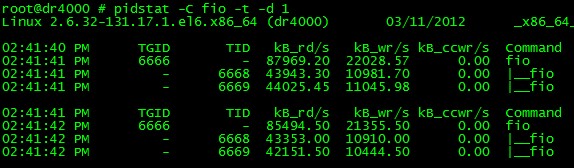
pidstat可以看到带层次线程IO活动
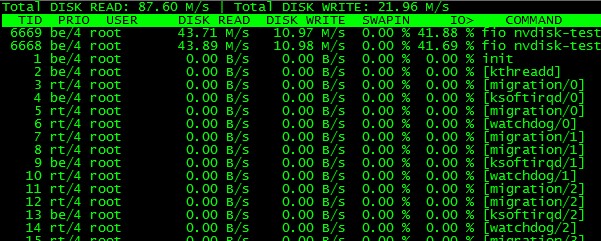
iotop能看到扁平线程IO活动
通过strace来了解到这二个软件关于IO活动部分输入源都是/proc/pid/io, 让我们来了解下这个文件:
# cat /proc/self/io
rchar: 1956
wchar: 0
syscr: 7
syscw: 0
read_bytes: 0
write_bytes: 0
cancelled_write_bytes: 0
这个文件后三个参数是IO记账功能新添加的,我们来了解下他们的意义,摘抄从man pidstat:
kB_rd/s
Number of kilobytes the task has caused to be read from disk per second.
kB_wr/s
Number of kilobytes the task has caused, or shall cause to be written to disk per second.
kB_ccwr/s
Number of kilobytes whose writing to disk has been cancelled by the task. This may occur when the task truncates some dirty page-
cache. In this case, some IO which another task has been accounted for will not be happening.
接着我们再来看下内核如何统计这三个值的,在RHEL 5U4源码数下简单的grep下:
[linux-2.6.18.x86_64]$ grep -rin task_io_account_ .
./block/ll_rw_blk.c:3286:               task_io_account_read(bio->bi_size);
./include/linux/task_io_accounting_ops.h:8:static inline void task_io_account_read(size_t bytes)
./include/linux/task_io_accounting_ops.h:13:static inline void task_io_account_write(size_t bytes)
./include/linux/task_io_accounting_ops.h:18:static inline void task_io_account_cancelled_write(size_t bytes)
./include/linux/task_io_accounting_ops.h:30:static inline void task_io_account_read(size_t bytes)
./include/linux/task_io_accounting_ops.h:34:static inline void task_io_account_write(size_t bytes)
./include/linux/task_io_accounting_ops.h:38:static inline void task_io_account_cancelled_write(size_t bytes)
./fs/direct-io.c:671:           task_io_account_write(len);
./fs/cifs/file.c:2221:                  task_io_account_read(bytes_read);
./fs/buffer.c:965:                              task_io_account_write(PAGE_CACHE_SIZE);
./fs/buffer.c:3400:                     task_io_account_cancelled_write(PAGE_CACHE_SIZE);
./mm/truncate.c:47:             task_io_account_cancelled_write(PAGE_CACHE_SIZE);
./mm/page-writeback.c:649:                                      task_io_account_write(PAGE_CACHE_SIZE);
./mm/readahead.c:180:           task_io_account_read(PAGE_CACHE_SIZE);
可以看出统计力度还是比较粗的。
同时Io记账相关的proc导出位于 fs/proc/base.c:
#ifdef CONFIG_TASK_IO_ACCOUNTING
static int do_io_accounting(struct task_struct *task, char *buffer, int whole)
{
 ...
        return sprintf(buffer,
                        "rchar: %llu\\n"
                        "wchar: %llu\\n"
                        "syscr: %llu\\n"
                        "syscw: %llu\\n"
                        "read_bytes: %llu\\n"
                        "write_bytes: %llu\\n"
                        "cancelled_write_bytes: %llu\\n",
                        rchar, wchar, syscr, syscw,
                        ioac.read_bytes, ioac.write_bytes,
                        ioac.cancelled_write_bytes);
}
简单的分析了下TASK_IO_ACCOUNTING运作方式,对了解每个进程的IO活动还是很有帮助的。另外再罗嗦下在RHEL 5U4是可以用这个功能的。