
写在前面
因为zepto、jQuery2.x.x和Nuclear都是为现代浏览器而出现,不兼容IE8,适合现代浏览器的web开发或者移动web/hybrid开发。每个框架类库被大量用户大规模使用都说明其戳中了开发者的刚需。本文将对比zepto/jQuery到Nuclear的设计和演化的过程。
无框架时代
互联网的春风刚刮来的时候,人们当时利用三剑客制作网页。
<div onclick="showMsg()"></div>

<script>
    functionshowMsg(){
        alert("恭喜你实现第一个人机交互程序");
    }
</script>
这里会发现showMsg必须是全局的,onclick触发才能访问,这样就会导致每绑一个事件就要污染一个全局变量。这点问题难不倒前端工程师,加个超级namespace,所有的事件挂在它下面:
<div onclick="SuperNamespce.showMsg1()"></div>
<div onclick="SuperNamespce.showMsg2()"></div>
<script>
    varSuperNamespce={};
    SuperNamespce.showMsg1=function(){
    }
    SuperNamespce.showMsg2=function(){
    }
</script>
但是也有问题,比如这样的场景:
varSuperNamespce={};
setTimeout(function(){
    SuperNamespce.showMsg1=function(){
    }
    SuperNamespce.showMsg2=function(){
    }
},4000)
或者更真实一点:
varSuperNamespce={};
ajax({
    url:"xxx",
    success:function(){
        SuperNamespce.showMsg1=function(){
        }
        SuperNamespce.showMsg2=function(){
        }
    }
})
在定时器没执行完成或者AJAX没有success之前,用户的所有交互都会报:
Uncaught TypeError:SuperNamespce.showMsg1 isnotafunction
Uncaught TypeError:SuperNamespce.showMsg2 isnotafunction
然后,善于记录分析总结思考提炼的工程师们拿出本子记录下最佳实践:
不建议在dom元素上直接声明事件绑定调用
声明式事件绑定所调用的方法必定要污染全局某个变量
声明式事件绑定的相关js未执行完的情况下发生人机交互会报脚本错误,且严重影响用户体验
建议在js中先查找dom、再给dom绑定事件
想象一下:一个按钮5秒后才绑的事件,用户前4秒内一直点都没反应,然后5秒到了,但是用户已经放弃该网页了。
util库时代
开发者们按照上面总结的最佳实践,重构了上面的代码:
<div id="myID1"></div>
<div id="myID2"></div>

<script>
    varmyID1=document.getElementById("myID1");
    varmyID2=document.getElementById("myID2")
    myID1.onclick=function(){
        alert(1);
    }
    myID2.onclick=function(){
        alert(2);
    }
</script>
这给开发者们带来了另外一个麻烦的问题,以前声明式直接在div上绑定事件不需要查找dom,所以不需要标记id,现在每个需要绑定事件的dom都需要标记id用于js查找。而且,这种写法依旧没有改变声明式事件绑定的一个问题:
js未执行完的情况下发生人机交互【虽然不会报脚本错误】,但是严重影响用户体验
比如你div是个按钮形态,看上去用户就想点,一直点一直点。但是js还没执行完,事件还没绑定上去。用户将收不到任何反馈。
但是开发者并不关系这‘毫秒’、甚至‘秒’级别的用户体验,也有的开发者利用UI逻辑去规避,比如先来个loading?比如绑定完事件再显示该dom。
就这样,这个问题就这么不了了之~~~~。随之而来的是:
查找dom好累,封个类库:
functionquery(selector){
    //此处省略一万行代码
}绑定事件好累,封个类库(edwards的events.js):
functionaddEvent(element,type,handler){
  // assign each event handler a unique ID
  if(!handler.$$guid)handler.$$guid=addEvent.guid++;
  // create a hash table of event types for the element
  if(!element.events)element.events={};
  // create a hash table of event handlers for each element/event pair
  varhandlers=element.events[type];
  if(!handlers){
    handlers=element.events[type]={};
    // store the existing event handler (if there is one)
    if(element["on"+type]){
      handlers[0]=element["on"+type];
    }
  }
  // store the event handler in the hash table
  handlers[handler.$$guid]=handler;
  // assign a global event handler to do all the work
  element["on"+type]=handleEvent;
};
// a counter used to create unique IDs
addEvent.guid=1;

functionremoveEvent(element,type,handler){
  // delete the event handler from the hash table
  if(element.events&&element.events[type]){
    deleteelement.events[type][handler.$$guid];
  }
};

functionhandleEvent(event){
  // grab the event object (IE uses a global event object)
  event=event||window.event;
  // get a reference to the hash table of event handlers
  varhandlers=this.events[event.type];
  // execute each event handler
  for(variinhandlers){
    this.$$handleEvent=handlers[i];
    this.$$handleEvent(event);
  }
};
再然后,开发者们觉得引用这么多工具库好累…
zepto/jQuery时代
开发者们觉得引用这么多工具库,而且他们其实都隶属于同一类东西(查找dom、dom绑定事件都是操作dom)可以糅合一起。就有了后来风靡全球的jQuery和zepto在web里实现人机交互:
$("#myID").click(function(){
    alert("恭喜你使用三行代码实现了人机交互程序");
})
开发者的刚需就是:找到dom、绑定事件、写逻辑。而且,上面的程序还不会丢失语义,一看就知道想干什么。但是:
js未执行完的情况下发生人机交互【虽然不会报脚本错误】,但是严重影响用户体验
开发者们被各种爽到之后,这个问题已经被抛到了九霄云外。那我们就继续往下看,看到哪个阶段把上面这个问题解决了?!
AngularJS
<div ng-app="myApp"ng-controller="personCtrl">
<button ng-click="toggle()">隐藏/显示</button>
<png-show="myVar">
AngularJS
</p>
</div>

<script>
varapp=angular.module('myApp',[]);
app.controller('personCtrl',function($scope){
    $scope.myVar=true;
    $scope.toggle=function(){
        $scope.myVar=!$scope.myVar;
    };
});
</script>
因为AngularJS通过ng-click绑定事件,所以没有解决。
React
varPhoto=React.createClass({
  toggleLiked:function(){
    this.setState({
      liked:!this.state.liked
    });
  },
  getInitialState:function(){
    return{
      liked:false
    }
  },
  render:function(){
    varbuttonClass=this.state.liked?'active':'';
    return(
      <div className='photo'>
        <button onClick={this.toggleLiked}className={buttonClass}>点我</button>
      </div>
    )
  }
});
因为React的布局和逻辑放在一起,解决了跨越了十多年之久的前端问题:
js未执行完的情况下发生人机交互【虽然不会报脚本错误】,但是严重影响用户体验
通过把相关的布局和逻辑放在同一个组件中,整个系统变得整洁清晰了。 我们为这个重要的洞见向 React 致敬。(引用于riot)
React的核心根本不是什么UI=fn(state);不用React也可以UI=fn(state)。
Nuclear
理念:some HTML + scoped CSS + JS === Reusable Component
Nuclear的网站在这里: http://alloyteam.github.io/Nuclear/ 里面有大量的介绍。
通过下面的使用方式:
varTodoApp=Nuclear.create({
    add:function(evt){
        evt.preventDefault();
        this.option.items.push(this.textBox.value);
    },
    render:function(){
        return'<div>\
                    <h3>TODO</h3>\
                    <ul> {{#items}} <li>{{.}}</li> {{/items}}</ul>\
                    <form onsubmit="add(event)" >\
                        <input nc-id="textBox" type="text"  />\
                        <button>Add #{{items.length}}</button>\
                    </form>\
                </div>';
    }
});
newTodoApp({items:[]},"#todoListContainer");
会在html里生成如下的结构:
<div data-nuclearid="0">
    <div>
        <h3>TODO</h3>
        <ul></ul>
        <form onsubmit="Nuclear.instances[0].add(event)">
            <input nc-id="textBox"type="text">
            <button>Add#0</button>
        </form>
    </div>
</div>
更为具体的对应可以看这张图片: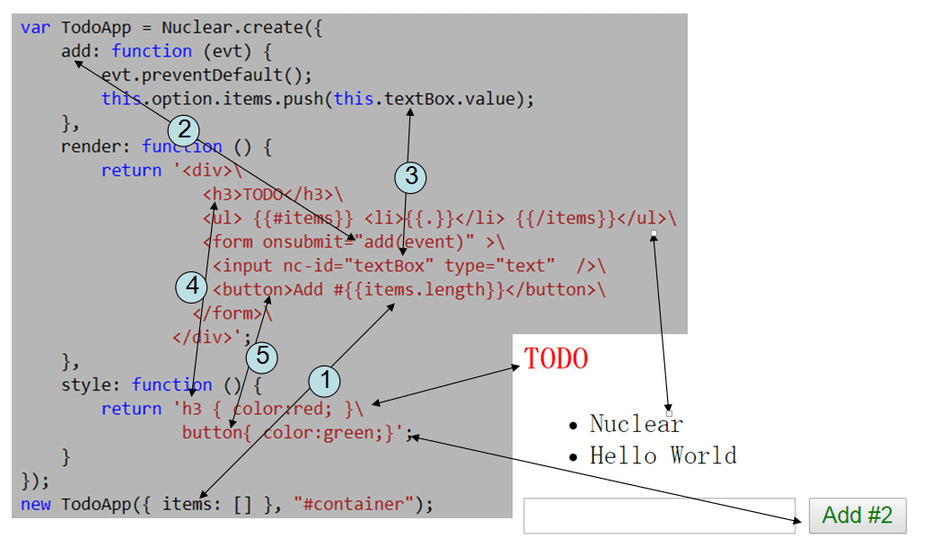
组件化编程
组件html结构、css和js必须在一起,要么都加载,要么都不加载。
只加载其中一部分都是浪费如css加载了,组件没用到js加载了,浪费带宽
带来不好的体验,如组件js加载完了,css却没加载完成,导致用户看到错乱的页面
脚本错误和糟糕体验,如组件HTML和css加载完了,js却没加载完成,导致用户交互无响应
Nuclear编程
组件化编程
超小的体积,5k
支持任意模板引擎
双向绑定改善编程体验
面向对象编程
支持局部CSS
回到最初的问题:
不建议在dom元素上直接声明事件绑定调用(Nuclear建议事件直接绑在dom上)
声明式事件绑定所调用的方法必定要污染全局某个变量(只污染了Nuclear)
声明式事件绑定的相关js未执行完的情况下发生人机交互会报脚本错误,且严重影响用户体验(组件化编程,组件的html、css和js是一个整体)
建议在js中先查找dom、再给dom绑定事件(Nuclear建议事件直接绑在dom上,查找dom的需要可以标记nc-id或者nc-class)
总之:使用Nuclear组件化编程,使组件的HTML、CSS和JS同时一起生效可以规避许多问题。
Github: https://github.com/AlloyTeam/Nuclear
感谢阅读~~